Group Z
Group B rally racing with (Z)ombies.

Part 1, 2.5D GameMaker Prototype
This game was supposed to be a 2-week project I started to get out of a rut in Untitled Space Game. When I was adding enemy vehicles for the space game, I had a thought that the ‘engine’ I was developing for the isometric style would pair well with the Group Z idea I had kicking around in my head. The goal was to copy the project, gut the alien stuff, add the car stuff, and make a quick racing game.
By the end of the first day I had a working prototype of a zombie-smashing racing game. I was well on track to achieve this within a few weeks, but as I was working on this while also in the throes of learning C at university, I was coming to very quickly outgrow both the 2D environment from a graphics perspective, and GameMaker from an engineering perspective. I also added out of car mechanics as a gameplay feature. It’s not relevant to the point I’m making I just wanted to post the clip.
Before I moved away from this version, I was making great progress in shader writing, where I developed a fake perspective projection for the 2.5D isometric environment. This made the racing mechanics much more fluid, but it only really scaled to the terrain which was kind of janky looking at high elevations.
The game also wasn’t ‘technically’ 3d, meaning depth testing was extremely cursed, especially for any of the upright characters and items. Because they are just 2D sprites and not drawn in 3D space, correct depth testing is nearly impossible. This was the last clip I ever posted of this version of the game.
Part 2, 3D GameMaker Prototype
After getting exhausted with mixing plain 2D drawing with 3D elements and trying to depth test between them, I decided to learn 3D properly to create Group Z from scratch. I had to swallow my pride and follow some tutorials for basic setup because loading .obj models in GameMaker Studio 1.4 is an absolute nightmare it turns out.
GameMaker has effectively no native 3D utilities, so I had to learn everything from scratch. I understoof how vertex buffers worked, and I wanted to start from a sprite batching system to overcome the sprite drawing nightmare of the 2.5D version. I then yoinked the driving code from the original, the tree sprites from CerebroID, and then there was a basic driving game in my first ever true 3D environment.
The next task was shadow mapping. In my 2.5D engines, shadows were always very awkward because there is no obvious way to do real shadows, so I was excited to learn how 3D games achieve it. Unfortunately GameMaker Studio 1.4 is OpenGL ES2 based, which makes shadow mapping very complicated for lack of non-UNORM textures. Thankfully there is a good tutorial for packing a 32-bit depth value into the 4 8-bit components, and with that I quickly figured out shadow mapping.
Funnily enough this version of GameMaker had absolutely no primitives for orthographic projection, and I didn’t understand 3D well enough yet, so I was actually using a perspective projection matrix for the shadow map. It worked okay but it’s funny to look back on.
I then worked on some more effects. A stencil-based water texture similar to the one I used in my previous engines, PCF soft shadows, and a terrain LOD system to improve performance
Then I got into reflections for the water, and rediscovered planar reflections from first principles because I didn’t know what that was yet. I thought it was quite convincing though, and really rounded off the stencil-based water I had developed.
However, I was learning way too fast. This two week project became a one-year-long on-and-off learning experience, where by the end of it I had outgrown GameMaker completely. I decided it was time to try a making a game in a real programming language, with a real graphics library.
Part 3, 3D raylib prototype
It took some deliberation to decide what graphics library to use for this. My C programming was getting quite good, having done a multithreaded HTTP server, data structures and algorithms, and a heap of other coursework with it. For the graphics library I wanted to use, I was deliberating between a few options, but settled on raylib because it is unbelievably easy to use. Within the first few hours, I had integrated Open Dynamics Engine for a small physics sandbox, complete with terrain and directional lighting.
I wanted this to be the ‘production’ attempt at making Group Z. The two-week throwaway project is now in its second year of production, but through this I grew to deeply understand computer graphics.
I worked back through shadow mapping, GPU mesh instancing, chunk LODs with multithreaded mesh generation and streaming with real-time updates, a particle system and some really nice driving physics through Open Dynamics Engine.
And then, naturally, I decided to throw most of it out in favour of a new technique that clicked in my brain. Deferred rendering. Once the renderer was working again, I set out to achieve volumetric fog / shadows (for some reason I cannot remember)
It was at this point that the graphics concepts people often talk about, like ray marching, were really starting to make sense. On the back of this I also worked through screen space reflections, using my new and shiny G-buffer. My normals were totally messed up for the most part though, so it was a little busted. Regardless it was fun to do!
Shortly after I added translucent shadows through dithering, covered by soft-shadow filtering for a nice (volumetric!) cloud shadow effect.
After that (the same day) I worked on a simple material system, with diffuse, normal, specular and emissive maps for the various meshes, including tiles. With this I added lights to the car, and little shiny spots to the gravel texture.
The final state of this version of the renderer was pretty nice looking, but performance left something to be desired. Specifically, the amount of terrain, grass and trees being drawn was hogging basically the entire frame budget.
It was at this point that I first identified how inefficient the instanced rendering functions in raylib were. I tried a few techniques to improve performance, like staggering foliage transform uploads over time with frustum culling and better chunk-distance LODs.
After that I set out to add water, using similar methods to the original GameMaker version to get interactive ripples. I use a standard framebuffer to draw ripple particles to both shift surface normals and displace vertices in a clipmap-like water mesh.
My understanding of PBR materials and the BRDF generally wasn’t that good at the time, so basically everything in this renderer had the plastic specular sheen. It makes the water look interesting, but if I were to do it again I could and would do it much better.
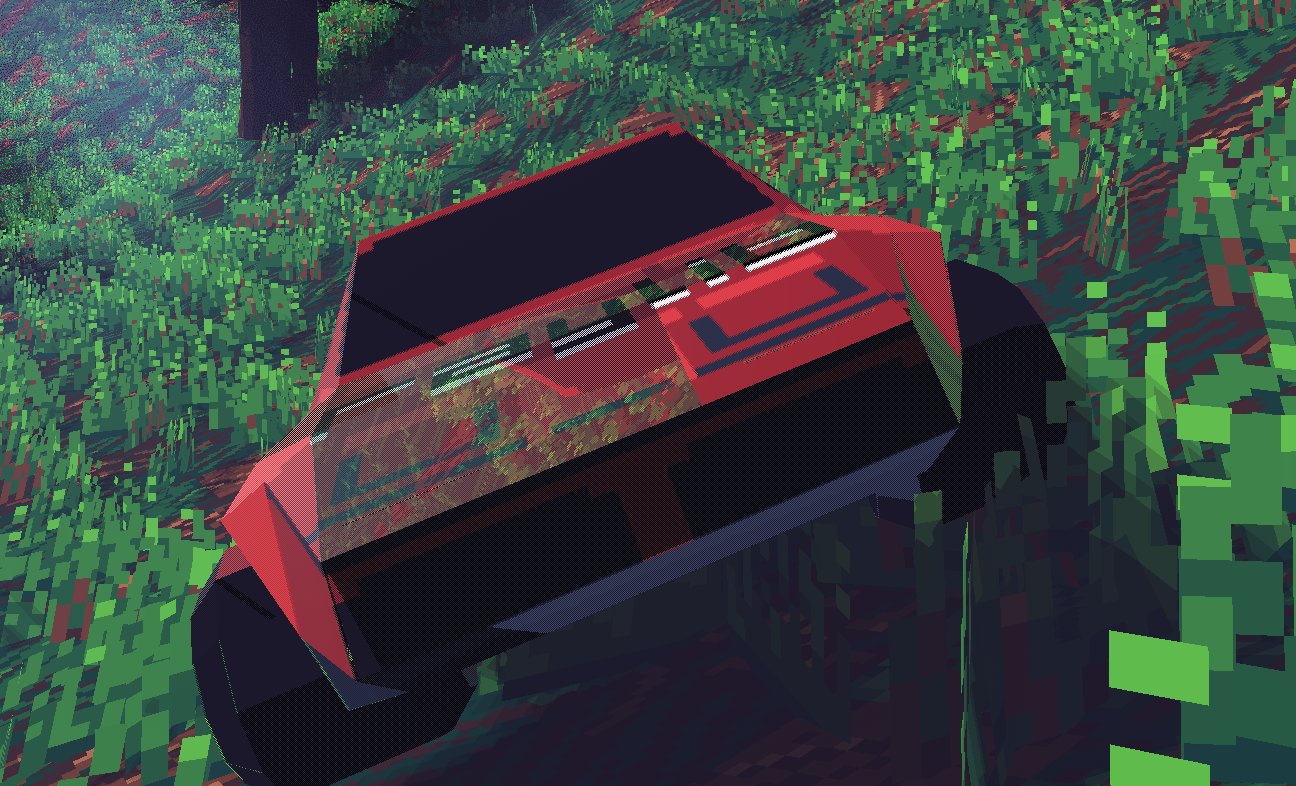
The next task was vehicle deformation. I used a simple analytical solution for this, attached to rendering of the vehicle mesh directly. I would use a finite set of vec4s in a uniform buffer, representing a position and radius, that would deform and skew the mesh. These were generated by calculating collision force from the physics engine. The math was not quite airtight but as a simple prototype the deformation was quite effective.
Following this I worked toward some real public-facing content for the game, starting with a simple guide for shadow mapping in raylib.
The last clip I ever posted of this renderer was to show off some space partitioning techniques I added, improving performance again.
Part 4, ???
Even though I have already gone through three renderers across two years for this game, I have learned enough about graphics and rendering that starting from scratch once again would probably be easier than decoding the spaghetti of another learning project.
I have a lot more experience in 3D graphics now, having learned a lot from this project and the several other projects since, I think I could do justice for the 2-week zombie racing game idea from late 2023.
Maybe its something I’ll try when my final year of university is closer to finishing. :)